In this guide
If you spend any time around developers, marketers or freelancers in 2026, you will hear "just automate it in n8n". It is one of the fastest-growing tools in the automation and AI space, yet most beginner explanations either stay vague or jump straight into server setup. This guide explains what n8n is, how it works, what it costs, what you can build with it and how to start, in plain language.
The quick answer
- What it is: a visual workflow automation platform where you connect apps and AI models with drag-and-drop nodes.
- What makes it different: you can self-host it, add your own JavaScript or Python, and build AI agents in the same editor.
- Who it suits: developers, marketers, operations teams, freelancers and students who want an in-demand automation skill.
What Is n8n?
n8n (pronounced "n-eight-n") is a workflow automation tool. You build an automation by placing steps on a canvas and connecting them: when something happens in one app (a form is submitted, an email arrives, a payment is made), n8n does a series of actions in other apps (save a row, send a message, create a task, ask an AI to write a reply) without you doing it by hand.
The name is short for nodemation: a mix of "node" (the building block of every workflow), Node.js (what it is built on) and "automation". It was created by Jan Oberhauser and is developed by n8n GmbH in Berlin; the project launched publicly in 2019, according to its Wikipedia entry.
Three things set it apart from simpler tools:
- You can self-host it. Run it on your own computer or server instead of paying per task on someone else's cloud.
- It is code-friendly. Where a ready-made node is not enough, a Code node lets you write JavaScript (or Python) in the middle of a workflow.
- It is built for AI. It has AI agent nodes that let a language model decide which tools to use, so you can build assistants and automations that "think" a step.
How n8n Works: The Five Building Blocks
| Term | What it means |
|---|---|
| Workflow | A set of connected nodes that automates one process, from start to finish. |
| Trigger node | The first node. It starts the workflow when an event happens: a form submission, a webhook call, a schedule, a new email. |
| Node | One step. It fetches data, changes it, or sends it somewhere. There are built-in nodes for hundreds of apps, community nodes, and you can build your own. |
| Execution | One run of a workflow. n8n records each execution so you can see what data went through every node and why something failed. |
| Credentials | The saved logins or API keys that let a node access your apps. They are stored once and reused. |
Here is a simple workflow: a student fills a form, the answer is saved, and the team is notified.
Data flows left to right. Each node receives the output of the previous one, so the AI step can use the name and question from the form, and the final step can include the AI reply in the message.
What Is n8n Used For? Real Examples
- Lead capture. When someone fills a website form, add them to a spreadsheet or CRM and send a WhatsApp, Telegram or email alert to your sales team.
- Social media and content. Collect ideas in a sheet, have an AI draft captions, and schedule or post them for review.
- Reports. Pull numbers from several tools every Monday and email a summary to your team.
- AI assistants. Build a support or FAQ bot that reads your documents and answers questions, with a human fallback.
- Data syncing. Keep two systems in step: a new order in a store creates an invoice, a row in a database, and a message in a chat channel.
- Internal ops. Onboard a new employee by creating accounts, sending a welcome email and adding calendar events from one trigger.
This is also why n8n is a useful freelance and job skill: small businesses pay for exactly these automations. See how automation fits into the wider picture in our post on the importance of digital marketing.
n8n and AI Agents
Classic automation follows fixed rules: if A, then B. An AI agent workflow adds a language model that can decide what to do next. In n8n you connect an AI Agent node to a chat model, give it tools (search the web, query a database, send an email) and optional memory, and it chooses which tool to use for each request. n8n integrates with LangChain through dedicated AI nodes, and newer versions can even draft a workflow from a plain-language prompt.
A useful rule: use a normal workflow when the steps are fixed, and add an agent only for the parts that need judgement, such as classifying an email or writing a reply. It is faster, cheaper and easier to debug that way.
If you want to get better at instructing models, our Prompt Engineering course is a natural companion to n8n.
n8n Pricing: Free Self-Hosting vs Cloud
There are two ways to run n8n: let n8n host it for you (cloud) or host it yourself. n8n charges by workflow executions per month, not by the number of steps or users. According to the official pricing page (annual billing, in euros, when we checked in October 2026):
| Plan | Price | Executions / month | Hosting |
|---|---|---|---|
| Starter | €20 per month | 2,500 | Hosted by n8n |
| Pro | €50 per month | 10,000 | Hosted by n8n |
| Business | €667 per month | 40,000 | Self-hosted |
| Enterprise | Contact sales | Custom | Hosted or self-hosted |
All plans include unlimited users and workflows. There is also a free Community Edition that you can self-host from GitHub. Prices and limits change, so confirm them on the pricing page before you decide.
How to Get Started With n8n
Option 1: n8n Cloud (easiest)
Sign up on n8n.io and start building in the browser, with nothing to install. This is the fastest way to learn the editor.
Option 2: Run it on your computer with Node.js
If you have Node.js installed, you can try n8n with a single command and open it in your browser:
npx n8n
# then open http://localhost:5678
Option 3: Run it with Docker
This is the setup the n8n docs describe for self-hosting. It keeps your data in a Docker volume so it survives restarts:
docker volume create n8n_data

docker run -it --rm --name n8n -p 5678:5678 \
  -v n8n_data:/home/node/.n8n \
  n8nio/n8n
# then open http://localhost:5678
For anything beyond learning, the n8n documentation recommends the Docker Compose method with a proper database, HTTPS and backups, so read the hosting guide before running it for a real business.
Build Your First Workflow in 10 Minutes
- Create a new workflow and add a Form Trigger node with two fields: name and question.
- Add a Google Sheets node to append each submission as a row. Connect your Google account once under credentials.
- Add an AI node (an OpenAI, Gemini or other chat model node) and write a prompt such as "Write a short, friendly reply to this question". Use the form fields in the prompt.
- Add a Gmail or Telegram node to send the AI reply to yourself first, so you can check the quality.
- Click Execute workflow, submit the form, and watch the data move through each node. Open any node to see exactly what went in and out.
- Activate the workflow when you are happy, so it runs on its own.
Debugging by inspecting each node's data is where most of the learning happens, so do not skip step 5.
n8n vs Zapier vs Make
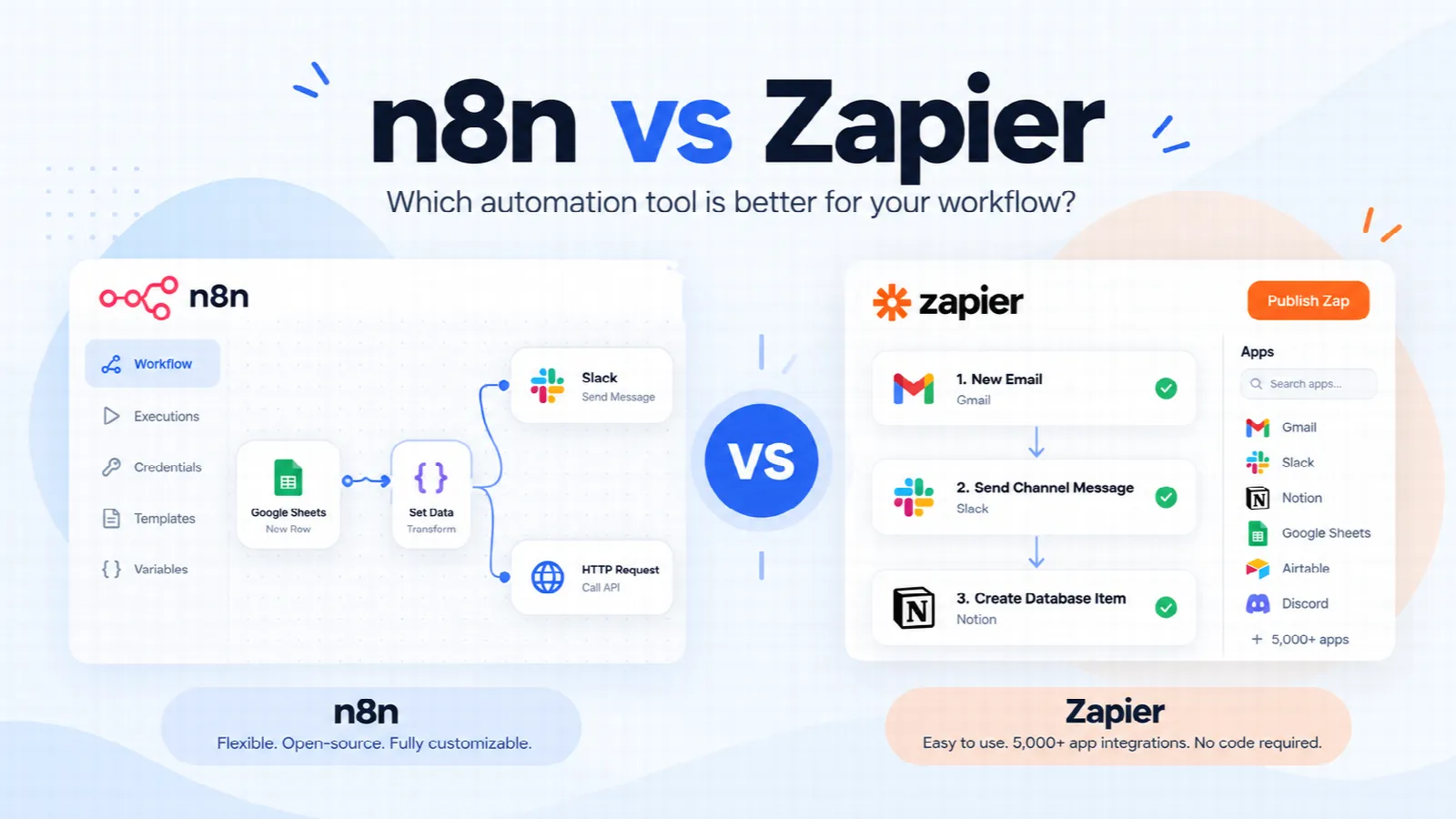
All three connect apps without code. In short: Zapier is the easiest to start with, Make sits in the middle with a visual canvas, and n8n gives the most control and the option to self-host, with a slightly steeper start. We compare them in detail, with a recommendation for learners, in n8n vs Zapier: which should you learn?
Should You Learn n8n? A Practical Learning Path
- Week 1: triggers, nodes and the data model (items and JSON). Build three small workflows.
- Week 2: webhooks, HTTP Request node, working with APIs and credentials. Connect two real apps.
- Week 3: logic (IF, Switch, Merge, loops), error handling and the Code node for JavaScript.
- Week 4: AI nodes and an agent with tools and memory, then deploy and monitor a workflow.
Basic JavaScript and understanding of APIs make everything faster, so a developer background helps, but plenty of non-developers learn n8n successfully. If you are early in your coding journey, our JavaScript roadmap and the full stack developer roadmap are good starting points.
Learn n8n With Real Projects
Leave your number and a Codeksha counsellor will call you back about the n8n Automation course and a free demo class.
Frequently Asked Questions
What does n8n stand for?
n8n is short for "nodemation", a blend of node, Node.js and automation. The "8" stands for the eight letters between the first and last "n".
Is n8n free?
The Community Edition can be self-hosted for free, though you pay for the server you run it on. The managed cloud plans are paid and priced by the number of workflow executions per month.
Is n8n open source?
It is source-available under n8n's own "fair-code" Sustainable Use License rather than an Open Source Initiative licence. You can view, self-host and modify the code, but you cannot sell it as a competing hosted service.
Do I need to know coding to use n8n?
No, you can build many workflows by connecting nodes. Basic JavaScript and a good grasp of APIs and JSON help a lot once you move to more advanced automations.
Is n8n better than Zapier?
It depends. Zapier is simpler to start with. n8n offers more control, self-hosting and strong AI agent features, which makes it a better long-term skill for developers and freelancers. See the full n8n vs Zapier comparison.
Can n8n build AI agents?
Yes. n8n has an AI Agent node and AI nodes built around LangChain, so you can connect a language model to tools, memory and your own data, and combine it with normal workflow steps.
How long does it take to learn n8n?
Most people build useful workflows within a week or two. Becoming comfortable with APIs, error handling and AI agents typically takes about a month of regular practice.
Want to Learn n8n Properly, With Real Projects?
Codeksha's n8n Automation course in Rajkot teaches you to build real workflows and AI agents, live and hands-on. Book a free demo class and see a session for yourself.
Book a Free Demo ClassGet Syllabus, Fees & a Free Demo
Tell us your number and a Codeksha counsellor will call you back about the n8n Automation course in Rajkot.